Case study, a large US public school district
Three paper processes, redesigned for a new system
A large US public school district ran HR changes, purchasing and travel claims for 130+ schools on paper, color-coded copies and basket mail. Each request passed through several approvers, and every handoff waited on paper. Ahead of a system upgrade, our three-person team worked out how each should run on the new one. I led the inquiries and current-state maps, and put together the vision books.
- Role
- Design Consultant
- Timeline
- 6 months
- Team
- 3-person HCD team
- Scale
- 130+ schools, 6,000+ employees
- 60+recommendations for the upgrade
- 16service blueprints
- 191pages across three vision books
01Problem
Paper, colored copies and basket mail
The district ran its core administrative work almost entirely on paper. Staff moved between fragmented systems, color-coded paper copies, physical filing rooms and basket mail, the internal mail that added a day or two to every handoff.
The same details were entered into several systems and formats, up to seven in one process. Nobody downstream heard when information changed hands, staff in schools had no access to the system at all, and workloads were tracked in paper files and email inboxes. With an enterprise system upgrade on the way, the district needed a user-centered vision for how these processes should work on it.
02Research
Many roles, and nobody with the whole picture
We ran contextual inquiries with 17+ roles across the three departments, from financial secretaries in schools to department directors, and mapped 34 roles across the processes in all.
The roles we mapped
- 8
Frontline staff
School administrators, financial secretaries and support staff
- 12
Specialists
HR, procurement and accounting staff doing the daily processing
- 6
Leadership
Directors, board members and approvers along the chain
- 5
External
Vendors, contractors and the systems that act in the flows
- 3
Cross-functional
Investigators, evaluators and compliance teams
Personas
From the interviews we built user profiles for each of the three processes, each one standing for a group of roles: what they are trying to do, what gets in the way and what they want changed. These six are the closest to the requests, reviews and approvals at the centre of the work.
Financial Secretary
Procurement, school office
Places every purchase for a school, from art supplies to textbooks, and gathers the budget, codes and approvals for each one.
“My main goal is to make sure our teachers and departments have the resources they need... but it feels like I’m constantly battling paperwork and chasing down signatures.”
Cares aboutKnowing where each request is, and getting approvals without chasing signatures.
Senior Buyer Specialist
Procurement, buyer team
Reviews requisitions for accuracy and buys instructional materials for the whole district.
“Keeping track of every detail, vendor redlines, review processes and post-change adjustments, is overwhelming, especially when information isn’t always shared across the team.”
Cares aboutRules that are followed and written down, so no purchase leads to a vendor protest.
Director of Purchasing
Procurement, purchasing team
Oversees all purchasing in the district, reviews contracts and leads the team of buyers.
“I ensure schools receive essential resources while meeting procurement regulations.”
Cares aboutMeeting colleagues’ needs quickly without breaking the procurement rules.
HR Specialist
HR personnel actions
Turns every change in the district, from a new hire to a transfer, into an update in the HR system, through a personnel action form (PAF).
“Anything that transpires within the county we have to change in the system... Everything I do involves a PAF in some shape or form.”
Cares aboutA system of record that keeps up with every change, without typing the same details twice.
Employee Records Management Specialist
HR personnel actions
Closes each personnel action and keeps every employee file complete and in order for an external audit.
“PAFs tell a story, they tell history of the employee.”
Cares aboutFiles that arrive complete, so they are always ready for an audit.
Accounting Technician
Travel and expense
Reviews every travel claim against the district’s policy and follows up on anything missing.
“I just want to get reimbursements processed quickly and accurately, but every incomplete form or missing receipt slows everything down.”
Cares aboutClaims that arrive with every attachment, so they can be paid without follow-ups.
No one person held the whole process
Each role knew its own steps well, but the processes were so intertwined that the full picture only came together over several rounds of validation, with each role filling in what the others could not.
03Turning point
The blueprints had to work for the people in them
We documented 20+ current-state workflows as service blueprints. After the first validation session it was clear that most employees did not read blueprints or process flows intuitively.
So I changed the approach for every session after it: either a short walkthrough of how to read a blueprint before we started, or a simpler visual language that met people where they were. Untangling processes this intertwined into clear pictures also took more drafts than I expected.
04Design
The future state, drawn as screens
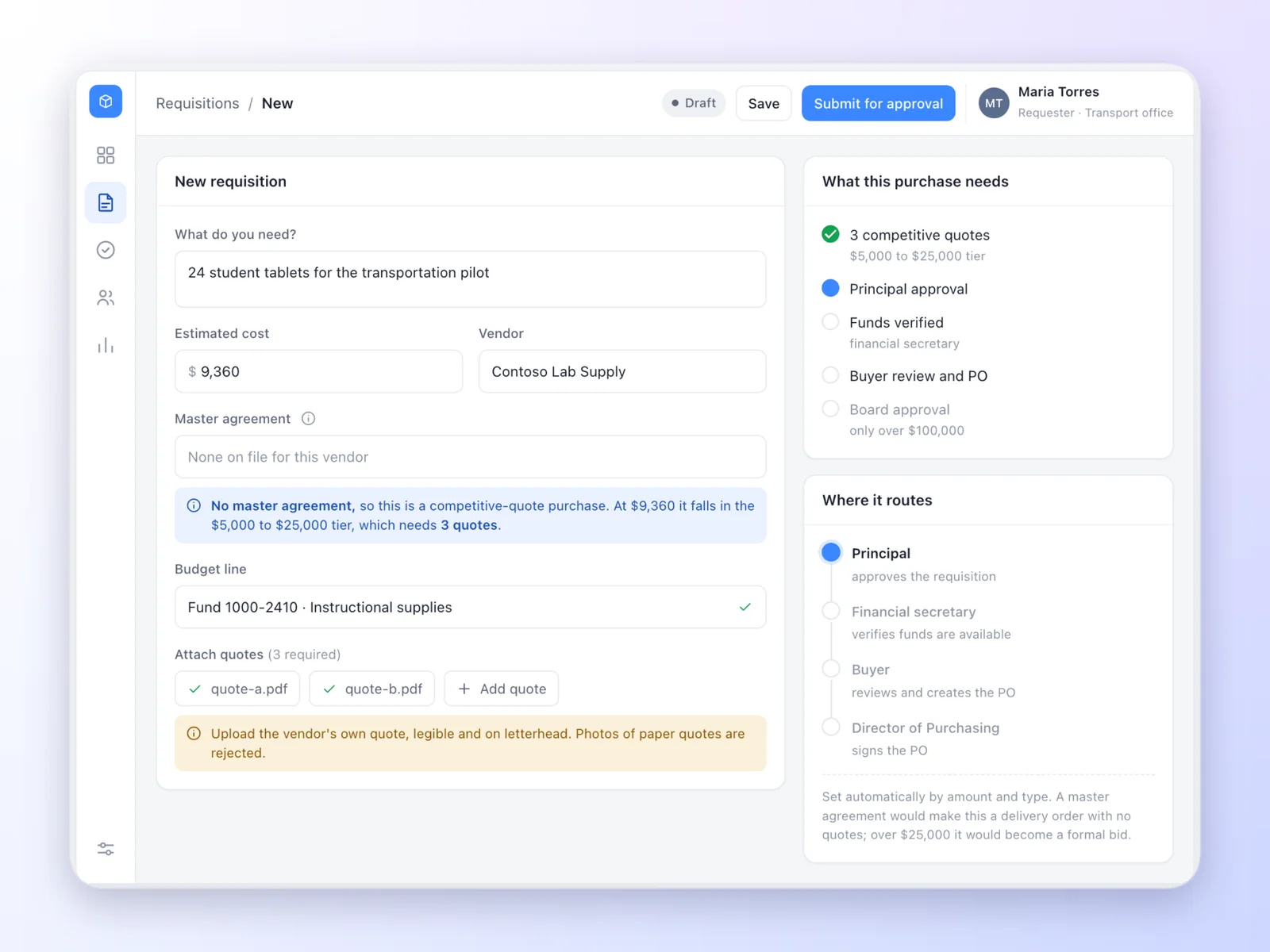
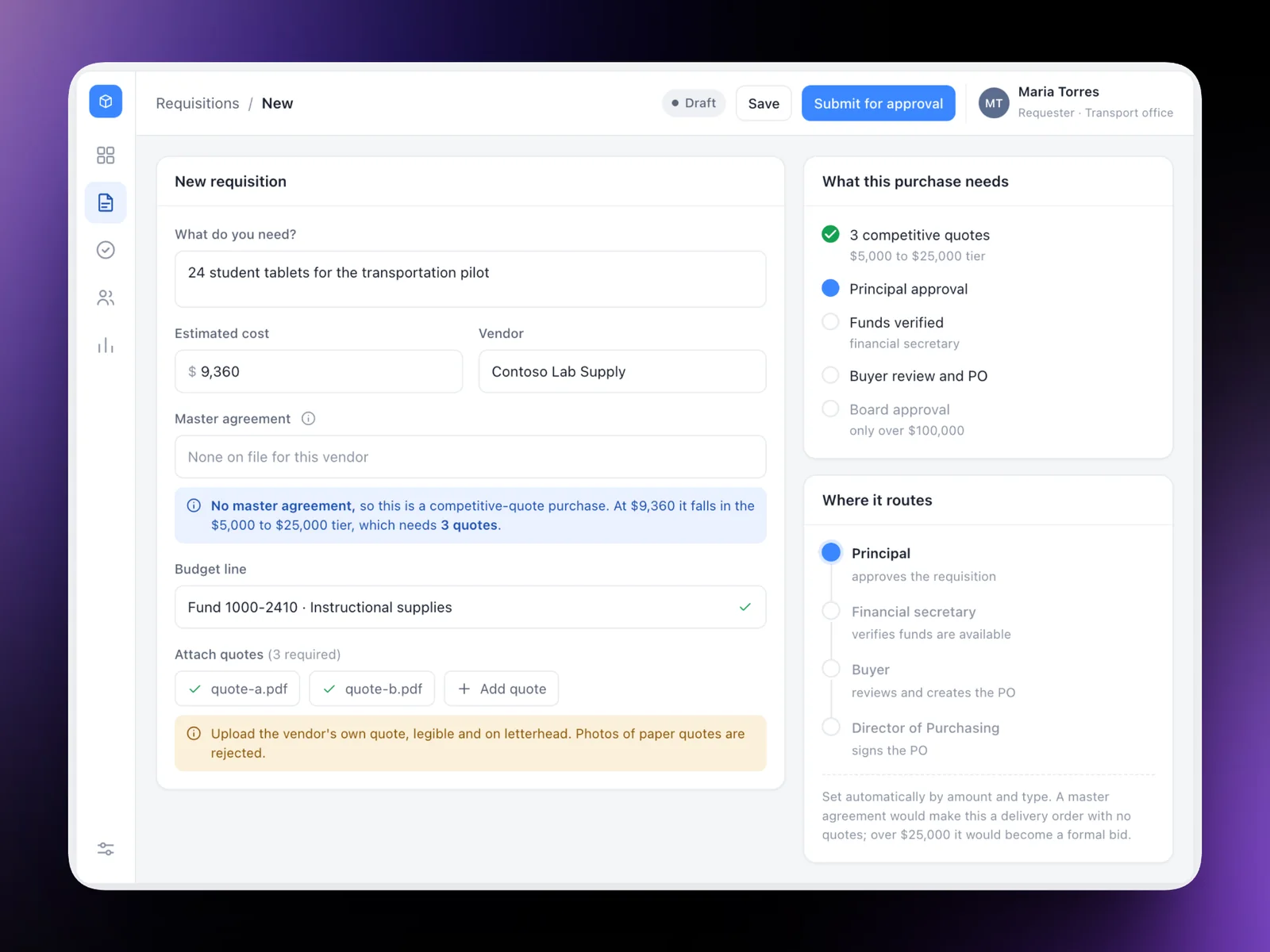
In workshops with the district's stakeholders and technical experts, we designed 20+ future-state workflows around three ideas: simplify the entry points, automate the handoffs, and connect the systems and roles. To show what that means in practice, I later redrew the request-to-purchase-order flow as screens, to the future state the project proposed.
-
Replaces: guessing the form and the quotes
A request that knows the rules
The school says what it needs and what it costs, and the form works out the rest: whether a master agreement applies, how many quotes the amount needs, and where the request will route. Conditions appear only when they apply.
-
Replaces: the five-copy paper trail
A buyer's worklist
Every open request in one list, with what needs action and what is due soon, so aging requests show up before they are late instead of after.
-
Replaces: hand-built purchase order packets
A purchase order built from the request
The purchase order carries the request's details over, lists the checks still to clear, and answers the questions buyers actually get stuck on, such as which commodity code to choose.
-
Replaces: basket mail between approvers
An approval route set by the purchase
The route is built from the amount and the type of purchase, and adds a Board review only for contracts of $100,000 or more. Sending back is instant and needs a reason, and the Director of Purchasing can sign from a phone.
05Impact
What the district got
Three vision books, 191 pages in all, with 60+ recommendations tied to what the new system could do and to the process changes around it. The work directly informed the technical configuration and the change management strategy for the upgrade.
The three vision books
HR personnel actions
Seven form formats and 8+ tools for new hires, transfers and separations, brought into one digital form with configurable approvals and automatic notices downstream.
56-page vision book
Procurement
10+ flows, from school purchases to competitive bids and construction change orders, made digital end to end, with a self-service portal for vendors.
91-page vision book
Travel and expense
100 to 200 paper mileage claims every two weeks, moved to a digital workflow with mapping for mileage, real-time budget checks and status updates.
44-page vision book
What I learned
Blueprints don’t speak for themselves
Most employees don’t interpret service blueprints or process flows intuitively. I learned this after the first validation session and shifted my approach: either running a brief familiarization walkthrough before each session or simplifying the visual language to meet people where they are.
Representing complexity takes iteration
A public school district of this scale has robust, compliance-driven systems that are deeply intertwined. Untangling these processes into clear, elegant visual representations took more iterations than I anticipated. Sometimes it takes several drafts of slicing and structuring a process before you arrive at the most effective representation.
No single person holds the full picture
The processes were so complex that no one individual understood them end-to-end. This meant building the complete picture required multiple rounds of validation across different user roles, each person filling in gaps the others couldn’t.